
PNG to SVG: turn an image into clean colour layers
Upload a logo, sign or drawing. Remeshy traces it in its own colours and gives you an SVG with one layer per colour, at the size you choose in millimetres.
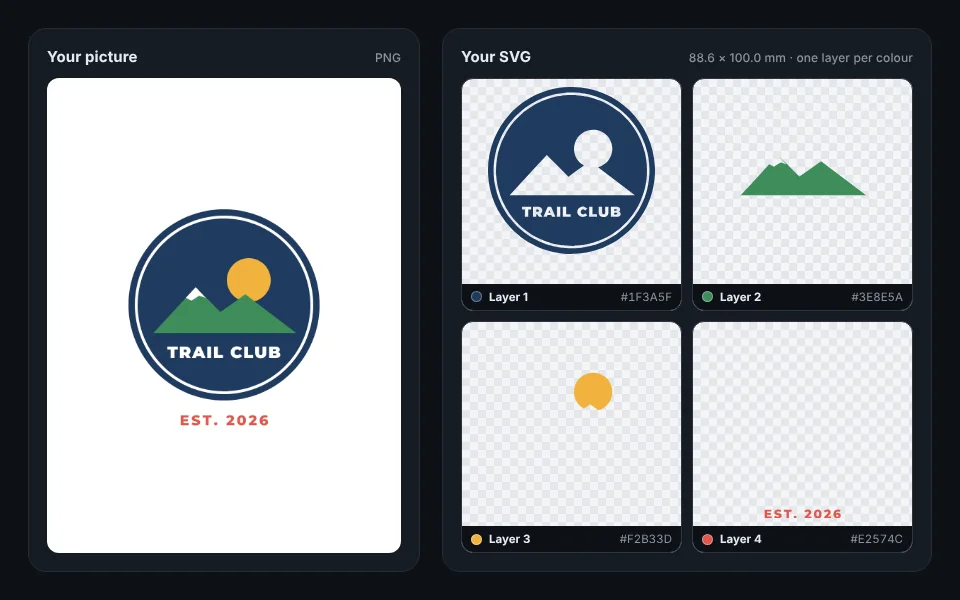
Now try it with your own picture
How to convert a PNG to SVG
Add your picture
Drop it in the box at the top of this page, or pick it from your phone. A logo, sign, sticker or drawing in flat colours works best.
Check the colours
Remeshy finds up to seven colours plus the background and traces each one. Change any colour, or tap Fewer colours to fold the smallest into the one nearest it.
Set the size
Choose the width in millimetres. The SVG comes out at exactly that size, so it needs no scaling in Design Space, Silhouette Studio or LightBurn.
Download the SVG
Tap Download and choose SVG. It opens in Design Space, Silhouette Studio, Inkscape, Illustrator and LightBurn.
What’s in the SVG
- One layer per colour, named with its colour, so each can be cut from its own vinyl or set as its own laser step.
- Smooth curves, not thousands of tiny steps, so cuts come out clean.
- Width and height in millimetres: one unit is one millimetre.
- Holes kept open: the inside of an O or an A is not filled in.
- Only your design: the background colour is left out.
Every picture is cleaned up by AI first, redrawn in flat colours, so even a messy one comes out clean. Flat colour art still gives the crispest layers.
Using it with your cutter
Cricut Design Space
Upload the SVG. Each colour comes in as its own layer, ready to cut from its own colour of vinyl. Check that the size reads as you set it.
Silhouette Studio
Open or import the SVG. Each colour is a group of its own, so you can cut the colours one at a time.
Glowforge and other lasers
Give each colour layer its own step: cut, score or engrave, in the order you want.
Need a DXF?
For CAD, CNC or LightBurn, download DXF instead: the same shapes as closed outlines, one layer per colour.
Or print it in 3D
The same design is also a multi-colour 3D print: each colour raised on a plate, at the size you choose, as a 3MF for Bambu Studio, OrcaSlicer and PrusaSlicer, or as an STL. Add a stand and it becomes a desk sign. More in PNG to STL.
Questions people ask
Do I need to install anything?
No. It works in your browser on a computer or a phone, and in the Remeshy app for iPhone and Android.
Does the SVG keep my colours?
Yes. Each colour in your picture becomes its own layer, filled with that colour: up to seven colours plus the background, which is left out.
Can I convert a JPG to SVG too?
Yes. PNG, JPG and WebP pictures all work. More in JPG to SVG.
Does it work with Cricut Design Space?
Yes. The SVG is sized in millimetres and each colour is its own layer, so Design Space can cut each colour from its own vinyl.
What pictures work best?
Flat colour art with clean edges: logos, signs, stickers, clip art and drawings. Photos and gradients trace into many small shapes.
Can I 3D print the design instead?
Yes. The same design becomes a multi-colour 3D print raised on a plate, downloaded as a 3MF for multi-colour printers or as an STL.
Turn your picture into an SVG
Pick a picture and see its colour layers in seconds.