
The best 3D printing apps for iPhone and iPhone Duo
Seven apps that cover the whole job from your phone: making a model or finding one, scanning, sculpting and keeping an eye on the print. We checked every App Store listing in the week iPhone Duo went on sale.
The short version
| App | Best for | Price |
|---|---|---|
| Remeshy | Making a printable model from a photo or a sentence | Free previews; subscription to create models |
| Bambu Handy | Bambu Lab printers and MakerWorld | Free; optional MakerLab credits |
| Prusa | Prusa printers and Printables | Free |
| Creality Cloud | Creality printers and slicing in the cloud | Free; optional Premium subscription |
| OctoApp | OctoPrint and Klipper setups | Free; optional unlock |
| Polycam | Scanning real objects | Free; Pro subscription for STL export |
| Nomad Sculpt | Sculpting your own models by hand | Paid upfront |
The apps
-
Remeshy
Making a printable model from a photo or a sentence
Made for iPhone DuoPhoto to 3DText to 3DSTL, OBJ, GLB, USDZTake a photo of something, or type what you want (“a dragon curled around a phone stand”), and Remeshy shows you a preview of the model it will make. If it looks right, tap Yes, Create 3D Model and you get a watertight model to turn around and export as STL for your slicer.
It also repairs broken STL files and has a library of free community models to download, all in the same app. These were made in Remeshy and printed by people who use it:
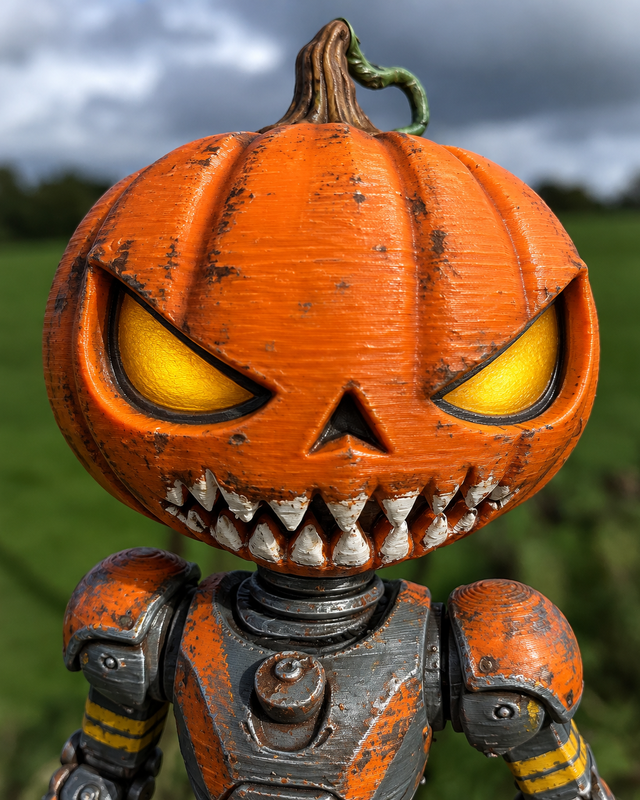
Pumpkin head robot droid a creepy Halloween themed pumpkin head robot droid
Anycubic Kobra X, PLASee it in 3D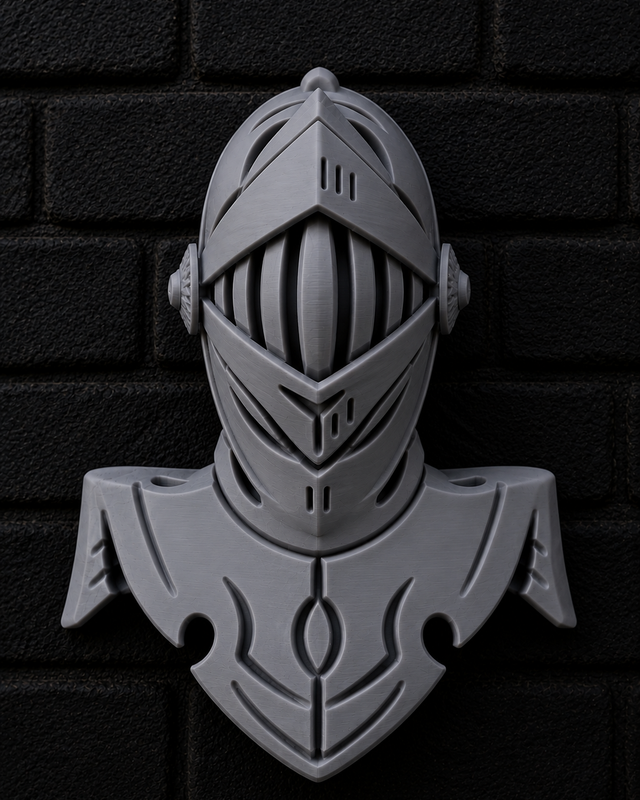
Medieval knight helmet bustMade from a photoBambu Lab A1 Mini, PLASee it in 3D 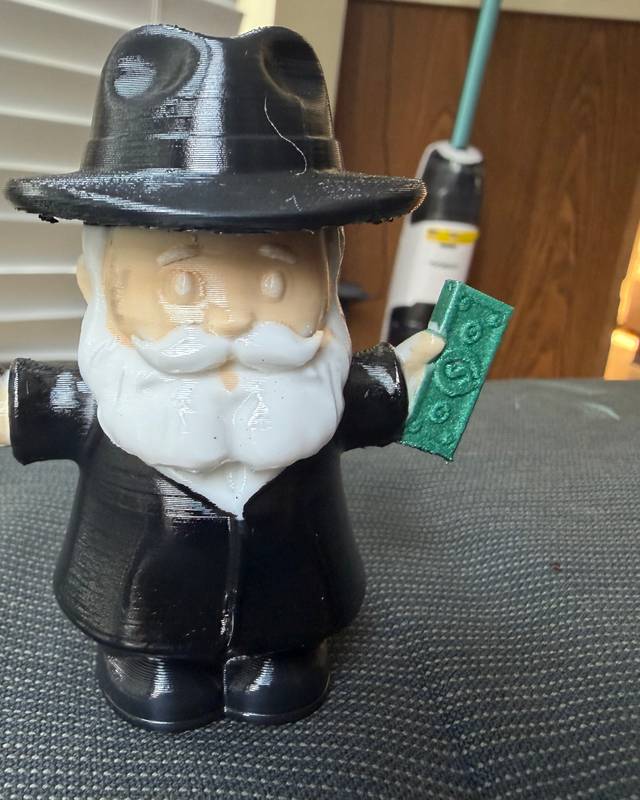
Old man figurine with moneyMade from a photoBambu Lab P1S, PLASee it in 3D On iPhone Duo, Remeshy is laid out for both screens: the 7.6-inch inner screen for checking a model from every side, and the 5.4-inch outer screen, with its own side rail, for quick jobs with the phone closed. It carries Apple’s Made for iPhone Duo label.
-
Bambu Handy
Bambu Lab printers and MakerWorld
Bambu Lab’s own app. Start and watch prints on your Bambu printer, see the live camera, get notifications about print status, and print free models from MakerWorld.
Price: Free; optional MakerLab creditsApp Store page -
Prusa
Prusa printers and Printables
Prusa Research’s app shows all your printers in Prusa Connect, lets you start, pause or stop a print from anywhere, and lets you browse Printables.com and send a model straight to print.
Price: FreeApp Store page -
Creality Cloud
Creality printers and slicing in the cloud
Creality’s app puts a large model library, slicing in the cloud (so you don’t need a computer) and remote control of your Creality printer in one place.
Price: Free; optional Premium subscriptionApp Store page -
OctoApp
OctoPrint and Klipper setups
A remote for printers running OctoPrint or Klipper (Moonraker, Mainsail, Fluidd), which now also supports Bambu Lab and Elegoo printers. Free to download, with an in-app purchase that unlocks every feature.
Price: Free; optional unlockApp Store page -
Polycam
Scanning real objects
Builds a 3D model from photos you take around an object, or with LiDAR on iPhones and iPads that have it. Exporting STL needs a Pro subscription. Scanning is the right choice when a print has to match the size of a real object.
Price: Free; Pro subscription for STL exportApp Store page -
Nomad Sculpt
Sculpting your own models by hand
A full digital sculpting app with clay, smoothing and masking brushes, painting and multiresolution sculpting. It exports STL and OBJ for printing. On iPhone Duo, the 7.6-inch inner screen gives you more room to sculpt than any other iPhone.
Price: Paid upfrontApp Store page
What’s different on iPhone Duo
Every iPhone app runs on iPhone Duo. Apps with Apple’s Made for iPhone Duo label on their App Store page have been built for both of its screens rather than stretched to fill the inner one, so look for the label before you buy.
The inner screen is where 3D work gets easier: it’s big enough to check a model, its supports and its thin parts before you print. The outer screen is handy for a quick look at a print’s progress without opening the phone.
How we chose
We picked one app for each part of the job (making, finding, scanning, sculpting and running the printer) and read each App Store listing on 28 October 2026. Prices and features change, so check the listing before you pay. On Android? See the best 3D printing apps for Android. For computer apps too, see 3D printing apps for every step.
Questions people ask
What is the best 3D printing app for iPhone?
It depends on the job. To make a new printable model from a photo or a description, use Remeshy. To run your printer, use the app from its maker: Bambu Handy, Prusa or Creality Cloud (or OctoApp for OctoPrint and Klipper). To copy a real object, scan it with Polycam; to sculpt by hand, use Nomad Sculpt.
Can you 3D print from an iPhone?
Yes. Bambu Handy, Prusa, Creality Cloud and OctoApp can all start and watch prints on a connected printer. To print your own design, make or download an STL file on your phone, then send it to your printer with its app or your slicer.
Which 3D printing apps work on iPhone Duo?
All of them run on it. Remeshy carries Apple’s Made for iPhone Duo label, which means it’s laid out for both screens. For any other app, check its App Store page for the label.
Can I make an STL file on my iPhone?
Yes. Remeshy makes an STL from a photo or a text description, Nomad Sculpt exports STL from your own sculpts, and Polycam exports STL from scans with its Pro plan.
Are these apps free?
Bambu Handy and Prusa are free. Remeshy, Creality Cloud, OctoApp and Polycam are free to download with optional purchases. Nomad Sculpt costs money up front.
Make your first model
Take a photo of anything and see a preview of the model before you pay a thing.